okmain
Okmain: OK main colors (Python edition)
okmain finds the main colors of an image and makes sure they look good.
Docs • PyPI Package • GitHub • Rust crate
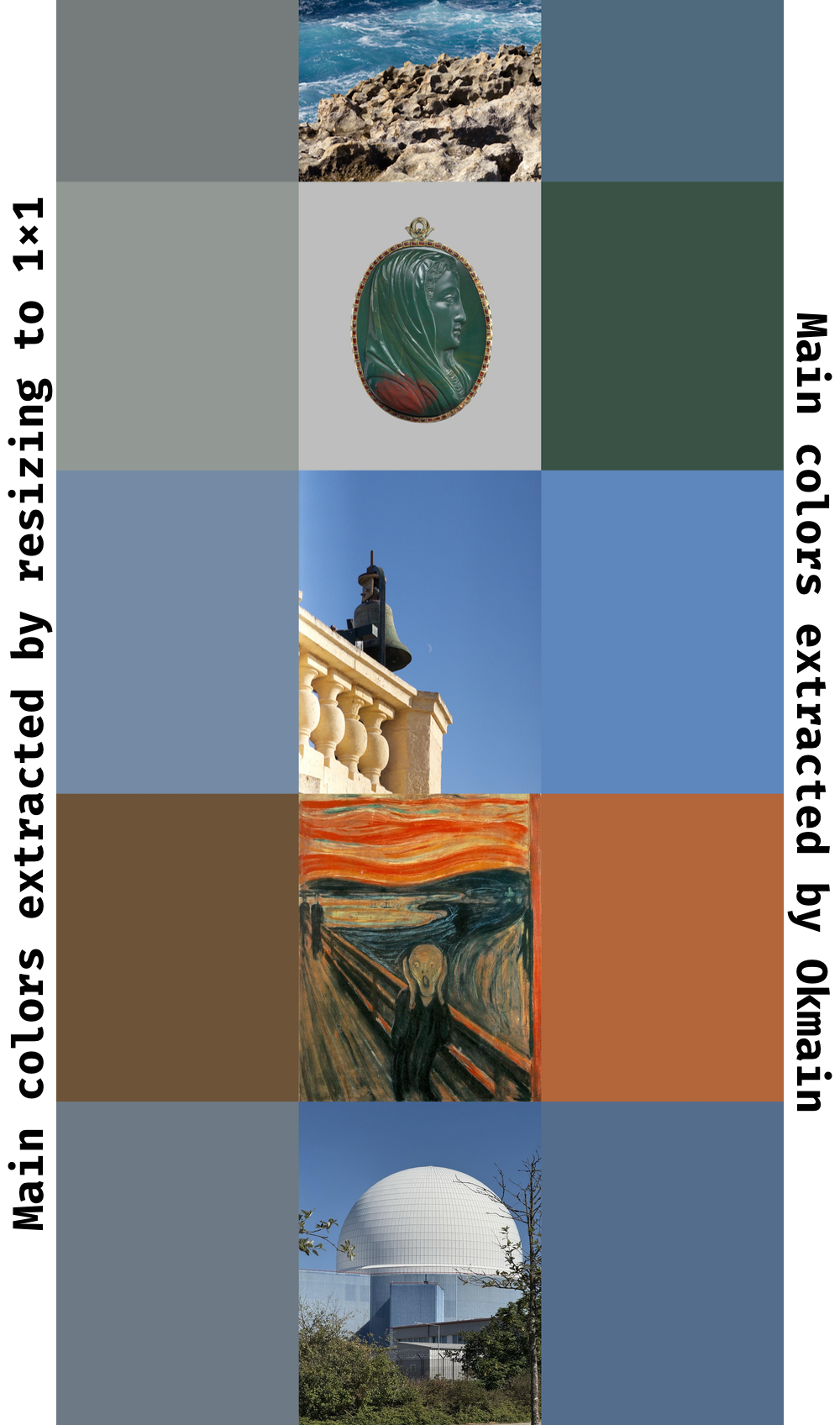
Sometimes you need to show a "dominant" color (or colors) of an image. It can be a background or a placeholder. There are several ways of doing that; a popular quick-and-dirty method is to resize the image to a handful of pixels, or even just one.
However, this method tends to produce muted, dirty-looking colors. Most images have clusters of colors: the dominant colors of an image of a lush green field with a clear sky above it are not a muddy average of blue and green, it's a bright blue and green. Okmain clusters colors explicitly, recovering and ranking main colors while keeping them sharp and clean.
Here's a comparison:
Technical highlights
- Color operations in a state-of-the-art perceptually linear color space (Oklab)
- Rust implementation for speed and safety
- Finding main colors of a reasonably sized image takes about 100ms
- Fast custom K-means color clustering, optimized for auto-vectorization (confirmed with disassembly)
- Position- and visual prominence-based color prioritization (more central and higher Oklab chroma pixels tend to be more important)
- Tunable parameters (see optional kwargs on
colors)
Read more about Okmain in the blog post.
Usage
Install the package:
uv add okmain
Call okmain.colors() on a PIL/Pillow image to get back a list of RGB colors:
import okmain
from PIL import Image

test_image = Image.open("test_image.jpeg")
dominant_colors = okmain.colors(test_image)
# dominant_colors are [okmain.RGB(r=..., g=..., b=...), ...)

css_hex = dominant_colors[0].to_hex()
# css_hex is a string like "#AABBCC"
API Documentation
  1"""
  2.. include:: ../README.md
  3
  4## API Documentation
  5"""
  6
  7from __future__ import annotations
  8
  9from dataclasses import dataclass
 10from typing import Literal, Self, overload
 11
 12from PIL import Image
 13
 14from okmain._core import (
 15    DEFAULT_CHROMA_WEIGHT,
 16    DEFAULT_MASK_SATURATED_THRESHOLD,
 17    DEFAULT_MASK_WEIGHT,
 18    DEFAULT_WEIGHTED_COUNTS_WEIGHT,
 19    _colors_debug,
 20    _DebugInfo,
 21    _ScoredCentroid,
 22)
 23
 24__all__ = [
 25    "colors",
 26    "RGB",
 27    "Oklab",
 28    "ScoredCentroid",
 29    "DebugInfo",
 30    "DEFAULT_MASK_SATURATED_THRESHOLD",
 31    "DEFAULT_MASK_WEIGHT",
 32    "DEFAULT_WEIGHTED_COUNTS_WEIGHT",
 33    "DEFAULT_CHROMA_WEIGHT",
 34]
 35
 36
 37@dataclass(frozen=True, slots=True)
 38class RGB:
 39    """An sRGB color with red, green, and blue components in the `[0, 255]` range."""
 40
 41    r: int
 42    g: int
 43    b: int
 44
 45    def to_hex(self) -> str:
 46        """Convert the color into hex representation, e.g. #FF0000 for pure red."""
 47        assert 0 <= self.r <= 255
 48        assert 0 <= self.g <= 255
 49        assert 0 <= self.b <= 255
 50
 51        return "#{:02X}{:02X}{:02X}".format(self.r, self.g, self.b)
 52
 53
 54@dataclass(frozen=True, slots=True)
 55class Oklab:
 56    """A color in the Oklab perceptually linear color space."""
 57
 58    l: float  # noqa: E741
 59    a: float
 60    b: float
 61
 62
 63@dataclass(frozen=True, slots=True)
 64class ScoredCentroid:
 65    """Debug details about a centroid in the Oklab color space and its score."""
 66
 67    rgb: RGB
 68    """sRGB color of the centroid."""
 69
 70    oklab: Oklab
 71    """Oklab color of the centroid."""
 72
 73    mask_weighted_counts: float
 74    """The fraction of pixels assigned to this centroid, with a mask reducing the impact
 75    of peripheral pixels applied."""
 76
 77    mask_weighted_counts_score: float
 78    """The score of the centroid based on mask-weighted pixel counts."""
 79
 80    chroma: float
 81    """Centroid's Oklab chroma (calculated from the Oklab value and normalized to `[0, 1]`)."""
 82    chroma_score: float
 83    """The score of the centroid based on chroma."""
 84
 85    final_score: float
 86    """The final score of the centroid, combining two scores based on provided weights."""
 87
 88    @classmethod
 89    def _from_core(cls, sc: _ScoredCentroid) -> Self:
 90        rgb_r, rgb_g, rgb_b = sc.rgb
 91        lab_l, lab_a, lab_b = sc.oklab
 92        return cls(
 93            rgb=RGB(rgb_r, rgb_g, rgb_b),
 94            oklab=Oklab(lab_l, lab_a, lab_b),
 95            mask_weighted_counts=sc.mask_weighted_counts,
 96            mask_weighted_counts_score=sc.mask_weighted_counts_score,
 97            chroma=sc.chroma,
 98            chroma_score=sc.chroma_score,
 99            final_score=sc.final_score,
100        )
101
102
103@dataclass(frozen=True, slots=True)
104class DebugInfo:
105    """Debug info returned by `colors()` when called with `with_debug_info=True`.
106    There are no stability guarantees for this class: it can be changed in a reverse-incompatible
107    way in a minor release."""
108
109    scored_centroids: list[ScoredCentroid]
110    """The Okmain algorithm looks for k-means centroids in the Oklab color space.
111    This field contains details about the centroids that were found in the image."""
112
113    kmeans_loop_iterations: list[int]
114    """The number of iterations the k-means algorithm took until the position of centroids stopped changing.
115    A list, because Okmain can re-run k-means with a lower number of centroids if some of the discovered centroids
116    are too close."""
117
118    kmeans_converged: list[bool]
119    """Did k-means search converge? If not, it was cut off by the maximum number of iterations.
120    A list for the same reason `kmeans_loop_iterations` is."""
121
122    @classmethod
123    def _from_core(cls, debug: _DebugInfo) -> Self:
124        # noinspection PyProtectedMember
125        return cls(
126            scored_centroids=[ScoredCentroid._from_core(sc) for sc in debug.scored_centroids],
127            kmeans_loop_iterations=list(debug.kmeans_loop_iterations),
128            kmeans_converged=list(debug.kmeans_converged),
129        )
130
131
132@overload
133def colors(
134        image: Image.Image,
135        *,
136        mask_saturated_threshold: float = ...,
137        mask_weight: float = ...,
138        mask_weighted_counts_weight: float = ...,
139        chroma_weight: float = ...,
140        with_debug_info: Literal[True],
141) -> tuple[list[RGB], DebugInfo]: ...
142
143
144@overload
145def colors(
146        image: Image.Image,
147        *,
148        mask_saturated_threshold: float = ...,
149        mask_weight: float = ...,
150        mask_weighted_counts_weight: float = ...,
151        chroma_weight: float = ...,
152        with_debug_info: Literal[False] = ...,
153) -> list[RGB]: ...
154
155
156def colors(
157        image: Image.Image,
158        *,
159        mask_saturated_threshold: float = DEFAULT_MASK_SATURATED_THRESHOLD,
160        mask_weight: float = DEFAULT_MASK_WEIGHT,
161        mask_weighted_counts_weight: float = DEFAULT_WEIGHTED_COUNTS_WEIGHT,
162        chroma_weight: float = DEFAULT_CHROMA_WEIGHT,
163        with_debug_info: bool = False,
164) -> list[RGB] | tuple[list[RGB], DebugInfo]:
165    """Extract dominant colors from a PIL image.
166
167    The image must be in RGB mode; other modes (e.g. RGBA) raise `ValueError`.
168
169    Returns up to four dominant colors as `RGB` values, sorted by dominance
170    (the most dominant color first). If some colors are too close, fewer colors
171    might be returned.
172
173    Pass `with_debug_info=True` to also receive a `DebugInfo` with internal
174    algorithm details. `DebugInfo` is not guaranteed to remain stable in minor releases.
175
176    Arguments:
177
178    - **image**: A PIL image in RGB mode. The color space is assumed to be sRGB.
179    - **mask_saturated_threshold**: The algorithm uses a mask to prioritize central pixels while
180      considering the relative color dominance. The mask is a 1.0-weight rectangle starting
181      at `mask_saturated_threshold * 100%` and finishing at
182      `(1.0 - mask_saturated_threshold) * 100%` on both axes, with linear weight falloff
183      from 1.0 at the border of the rectangle to 0.1 at the border of the image.
184      Must be in the `[0.0, 0.5)` range.
185    - **mask_weight**: The weight of the mask, which can be used to reduce the impact of the mask
186      on less-central pixels. By default it's set to 1.0, but by reducing this number you
187      can increase the relative contribution of peripheral pixels.
188      Must be in the `[0.0, 1.0]` range.
189    - **mask_weighted_counts_weight**: After the number of pixels belonging to every color is added
190      up (with the mask reducing the contribution of peripheral pixels), the sums are
191      normalized to add up to 1.0, and used as a part of the final score that decides the
192      ordering of the colors. This parameter sets the relative weight of this component in
193      the final score. Must be in the `[0.0, 1.0]` range and add up to 1.0 together with
194      `chroma_weight`.
195    - **chroma_weight**: For each color, its saturation (Oklab chroma) is used to prioritize colors
196      that are visually more prominent. This parameter controls the relative contribution
197      of chroma to the final score. Must be in the `[0.0, 1.0]` range and add up to
198      1.0 together with `mask_weighted_counts_weight`.
199    - **with_debug_info**: If `True`, return a `(colors, debug_info)` tuple instead of just the
200      color list.
201
202    Returns a list of `RGB` colors sorted by dominance, or a tuple of that list and a
203    `DebugInfo` if `with_debug_info=True`.
204
205    Raises `ValueError` if the image mode is not RGB, or if any config parameter is out of range.
206    """
207    if image.mode != "RGB":
208        raise ValueError(f"expected RGB image, got {image.mode!r}")
209    buf = image.tobytes()
210    width, height = image.size
211    raw_colors, raw_debug = _colors_debug(
212        buf,
213        width,
214        height,
215        mask_saturated_threshold,
216        mask_weight,
217        mask_weighted_counts_weight,
218        chroma_weight,
219    )
220    color_list = [RGB(*c) for c in raw_colors]
221    if with_debug_info:
222        # noinspection PyProtectedMember
223        return color_list, DebugInfo._from_core(raw_debug)
224    return color_list
157def colors(
158        image: Image.Image,
159        *,
160        mask_saturated_threshold: float = DEFAULT_MASK_SATURATED_THRESHOLD,
161        mask_weight: float = DEFAULT_MASK_WEIGHT,
162        mask_weighted_counts_weight: float = DEFAULT_WEIGHTED_COUNTS_WEIGHT,
163        chroma_weight: float = DEFAULT_CHROMA_WEIGHT,
164        with_debug_info: bool = False,
165) -> list[RGB] | tuple[list[RGB], DebugInfo]:
166    """Extract dominant colors from a PIL image.
167
168    The image must be in RGB mode; other modes (e.g. RGBA) raise `ValueError`.
169
170    Returns up to four dominant colors as `RGB` values, sorted by dominance
171    (the most dominant color first). If some colors are too close, fewer colors
172    might be returned.
173
174    Pass `with_debug_info=True` to also receive a `DebugInfo` with internal
175    algorithm details. `DebugInfo` is not guaranteed to remain stable in minor releases.
176
177    Arguments:
178
179    - **image**: A PIL image in RGB mode. The color space is assumed to be sRGB.
180    - **mask_saturated_threshold**: The algorithm uses a mask to prioritize central pixels while
181      considering the relative color dominance. The mask is a 1.0-weight rectangle starting
182      at `mask_saturated_threshold * 100%` and finishing at
183      `(1.0 - mask_saturated_threshold) * 100%` on both axes, with linear weight falloff
184      from 1.0 at the border of the rectangle to 0.1 at the border of the image.
185      Must be in the `[0.0, 0.5)` range.
186    - **mask_weight**: The weight of the mask, which can be used to reduce the impact of the mask
187      on less-central pixels. By default it's set to 1.0, but by reducing this number you
188      can increase the relative contribution of peripheral pixels.
189      Must be in the `[0.0, 1.0]` range.
190    - **mask_weighted_counts_weight**: After the number of pixels belonging to every color is added
191      up (with the mask reducing the contribution of peripheral pixels), the sums are
192      normalized to add up to 1.0, and used as a part of the final score that decides the
193      ordering of the colors. This parameter sets the relative weight of this component in
194      the final score. Must be in the `[0.0, 1.0]` range and add up to 1.0 together with
195      `chroma_weight`.
196    - **chroma_weight**: For each color, its saturation (Oklab chroma) is used to prioritize colors
197      that are visually more prominent. This parameter controls the relative contribution
198      of chroma to the final score. Must be in the `[0.0, 1.0]` range and add up to
199      1.0 together with `mask_weighted_counts_weight`.
200    - **with_debug_info**: If `True`, return a `(colors, debug_info)` tuple instead of just the
201      color list.
202
203    Returns a list of `RGB` colors sorted by dominance, or a tuple of that list and a
204    `DebugInfo` if `with_debug_info=True`.
205
206    Raises `ValueError` if the image mode is not RGB, or if any config parameter is out of range.
207    """
208    if image.mode != "RGB":
209        raise ValueError(f"expected RGB image, got {image.mode!r}")
210    buf = image.tobytes()
211    width, height = image.size
212    raw_colors, raw_debug = _colors_debug(
213        buf,
214        width,
215        height,
216        mask_saturated_threshold,
217        mask_weight,
218        mask_weighted_counts_weight,
219        chroma_weight,
220    )
221    color_list = [RGB(*c) for c in raw_colors]
222    if with_debug_info:
223        # noinspection PyProtectedMember
224        return color_list, DebugInfo._from_core(raw_debug)
225    return color_list
Extract dominant colors from a PIL image.
The image must be in RGB mode; other modes (e.g. RGBA) raise ValueError.
Returns up to four dominant colors as RGB values, sorted by dominance
(the most dominant color first). If some colors are too close, fewer colors
might be returned.
Pass with_debug_info=True to also receive a DebugInfo with internal
algorithm details. DebugInfo is not guaranteed to remain stable in minor releases.
Arguments:
- image: A PIL image in RGB mode. The color space is assumed to be sRGB.
- mask_saturated_threshold: The algorithm uses a mask to prioritize central pixels while
considering the relative color dominance. The mask is a 1.0-weight rectangle starting
at
mask_saturated_threshold * 100%and finishing at(1.0 - mask_saturated_threshold) * 100%on both axes, with linear weight falloff from 1.0 at the border of the rectangle to 0.1 at the border of the image. Must be in the[0.0, 0.5)range. - mask_weight: The weight of the mask, which can be used to reduce the impact of the mask
on less-central pixels. By default it's set to 1.0, but by reducing this number you
can increase the relative contribution of peripheral pixels.
Must be in the
[0.0, 1.0]range. - mask_weighted_counts_weight: After the number of pixels belonging to every color is added
up (with the mask reducing the contribution of peripheral pixels), the sums are
normalized to add up to 1.0, and used as a part of the final score that decides the
ordering of the colors. This parameter sets the relative weight of this component in
the final score. Must be in the
[0.0, 1.0]range and add up to 1.0 together withchroma_weight. - chroma_weight: For each color, its saturation (Oklab chroma) is used to prioritize colors
that are visually more prominent. This parameter controls the relative contribution
of chroma to the final score. Must be in the
[0.0, 1.0]range and add up to 1.0 together withmask_weighted_counts_weight. - with_debug_info: If
True, return a(colors, debug_info)tuple instead of just the color list.
Returns a list of RGB colors sorted by dominance, or a tuple of that list and a
DebugInfo if with_debug_info=True.
Raises ValueError if the image mode is not RGB, or if any config parameter is out of range.
38@dataclass(frozen=True, slots=True)
39class RGB:
40    """An sRGB color with red, green, and blue components in the `[0, 255]` range."""
41
42    r: int
43    g: int
44    b: int
45
46    def to_hex(self) -> str:
47        """Convert the color into hex representation, e.g. #FF0000 for pure red."""
48        assert 0 <= self.r <= 255
49        assert 0 <= self.g <= 255
50        assert 0 <= self.b <= 255
51
52        return "#{:02X}{:02X}{:02X}".format(self.r, self.g, self.b)
An sRGB color with red, green, and blue components in the [0, 255] range.
46    def to_hex(self) -> str:
47        """Convert the color into hex representation, e.g. #FF0000 for pure red."""
48        assert 0 <= self.r <= 255
49        assert 0 <= self.g <= 255
50        assert 0 <= self.b <= 255
51
52        return "#{:02X}{:02X}{:02X}".format(self.r, self.g, self.b)
Convert the color into hex representation, e.g. #FF0000 for pure red.
55@dataclass(frozen=True, slots=True)
56class Oklab:
57    """A color in the Oklab perceptually linear color space."""
58
59    l: float  # noqa: E741
60    a: float
61    b: float
A color in the Oklab perceptually linear color space.
 64@dataclass(frozen=True, slots=True)
 65class ScoredCentroid:
 66    """Debug details about a centroid in the Oklab color space and its score."""
 67
 68    rgb: RGB
 69    """sRGB color of the centroid."""
 70
 71    oklab: Oklab
 72    """Oklab color of the centroid."""
 73
 74    mask_weighted_counts: float
 75    """The fraction of pixels assigned to this centroid, with a mask reducing the impact
 76    of peripheral pixels applied."""
 77
 78    mask_weighted_counts_score: float
 79    """The score of the centroid based on mask-weighted pixel counts."""
 80
 81    chroma: float
 82    """Centroid's Oklab chroma (calculated from the Oklab value and normalized to `[0, 1]`)."""
 83    chroma_score: float
 84    """The score of the centroid based on chroma."""
 85
 86    final_score: float
 87    """The final score of the centroid, combining two scores based on provided weights."""
 88
 89    @classmethod
 90    def _from_core(cls, sc: _ScoredCentroid) -> Self:
 91        rgb_r, rgb_g, rgb_b = sc.rgb
 92        lab_l, lab_a, lab_b = sc.oklab
 93        return cls(
 94            rgb=RGB(rgb_r, rgb_g, rgb_b),
 95            oklab=Oklab(lab_l, lab_a, lab_b),
 96            mask_weighted_counts=sc.mask_weighted_counts,
 97            mask_weighted_counts_score=sc.mask_weighted_counts_score,
 98            chroma=sc.chroma,
 99            chroma_score=sc.chroma_score,
100            final_score=sc.final_score,
101        )
Debug details about a centroid in the Oklab color space and its score.
104@dataclass(frozen=True, slots=True)
105class DebugInfo:
106    """Debug info returned by `colors()` when called with `with_debug_info=True`.
107    There are no stability guarantees for this class: it can be changed in a reverse-incompatible
108    way in a minor release."""
109
110    scored_centroids: list[ScoredCentroid]
111    """The Okmain algorithm looks for k-means centroids in the Oklab color space.
112    This field contains details about the centroids that were found in the image."""
113
114    kmeans_loop_iterations: list[int]
115    """The number of iterations the k-means algorithm took until the position of centroids stopped changing.
116    A list, because Okmain can re-run k-means with a lower number of centroids if some of the discovered centroids
117    are too close."""
118
119    kmeans_converged: list[bool]
120    """Did k-means search converge? If not, it was cut off by the maximum number of iterations.
121    A list for the same reason `kmeans_loop_iterations` is."""
122
123    @classmethod
124    def _from_core(cls, debug: _DebugInfo) -> Self:
125        # noinspection PyProtectedMember
126        return cls(
127            scored_centroids=[ScoredCentroid._from_core(sc) for sc in debug.scored_centroids],
128            kmeans_loop_iterations=list(debug.kmeans_loop_iterations),
129            kmeans_converged=list(debug.kmeans_converged),
130        )
Debug info returned by colors() when called with with_debug_info=True.
There are no stability guarantees for this class: it can be changed in a reverse-incompatible
way in a minor release.
The Okmain algorithm looks for k-means centroids in the Oklab color space. This field contains details about the centroids that were found in the image.
The number of iterations the k-means algorithm took until the position of centroids stopped changing. A list, because Okmain can re-run k-means with a lower number of centroids if some of the discovered centroids are too close.
Did k-means search converge? If not, it was cut off by the maximum number of iterations.
A list for the same reason kmeans_loop_iterations is.